The best open source AI models have transformed what’s possible for individuals and businesses who want powerful AI without subscription fees, privacy concerns, or vendor lock-in. Whether you’re a developer seeking coding assistance, a business owner protecting sensitive data, or simply someone who wants AI freedom, open source models offer compelling alternatives to commercial options.
I’ve spent the past 18 months testing, deploying, and comparing dozens of open source AI models across various use cases. From running Llama 3 on my personal laptop to deploying Mistral models for enterprise clients, I’ve gained deep practical knowledge about what works, what doesn’t, and which models deliver genuine value.
The open source AI landscape has exploded recently. Models that rival ChatGPT’s capabilities are now freely available to download and run on your own hardware. This democratization of AI represents one of the most significant technology shifts of our generation.
In this comprehensive guide, I’ll share everything I’ve learned about the best open source AI models available today. You’ll discover which models excel at specific tasks, how to run them on your own computer, and how they honestly compare to commercial alternatives.
Let’s explore the world of free, private, and powerful AI.
Table of Contents
Why the Best Open Source AI Models Matter in 2026
Before diving into specific models, let’s understand why the best open source AI models have become so important.
The Privacy Revolution
When you use ChatGPT or Claude through their web interfaces, your conversations travel to company servers. For many use cases, this is perfectly fine. But for sensitive business data, legal documents, medical information, or proprietary code, sending data to third parties creates unacceptable risks.
The best open source AI models run entirely on your own hardware. Your data never leaves your computer or private servers. This local processing eliminates privacy concerns that prevent many organizations from adopting AI.
Cost Savings at Scale
Commercial AI APIs charge per token, which adds up quickly for high-volume applications. A single heavy user might spend $100-500 monthly on API calls. Businesses processing thousands of documents or customer inquiries face bills in the thousands.
The best open source AI models require only upfront hardware investment and electricity costs. Once deployed, you can process unlimited requests at essentially zero marginal cost.
Freedom from Vendor Lock-In
Relying on commercial AI creates dependency. If OpenAI changes pricing, modifies content policies, or experiences outages, your operations suffer. The best open source AI models provide independence and control over your AI infrastructure.
Customization Possibilities
Open source models can be fine-tuned for specific domains, modified for unique use cases, and integrated deeply into custom applications. Commercial APIs offer limited customization compared to the flexibility of open source alternatives.
Top 15 Best Open Source AI Models Ranked and Reviewed
Based on extensive testing across various tasks, here are the best open source AI models available today:
1. Llama 3 (Meta): Best Overall Open Source AI Model
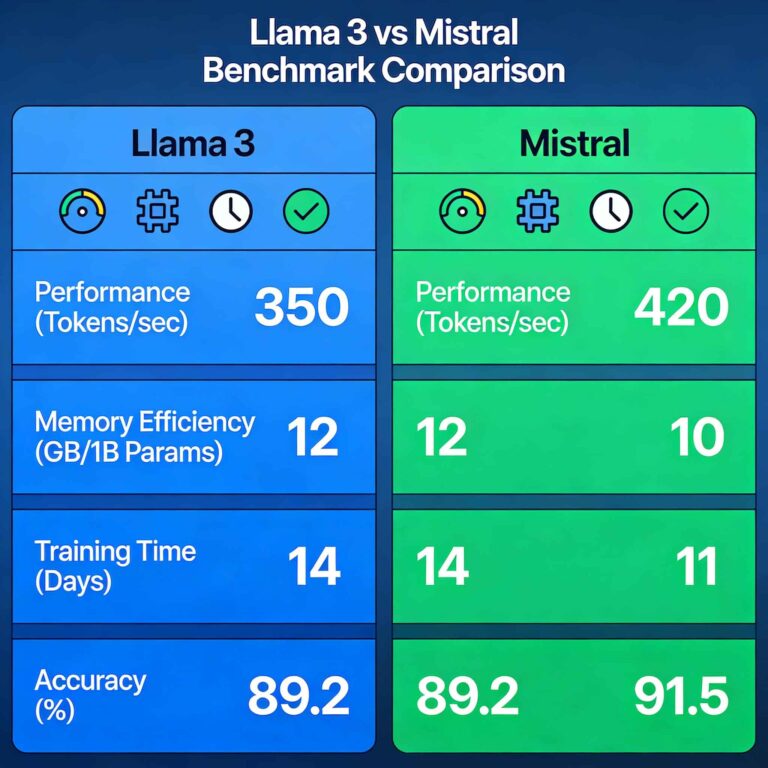
Meta’s Llama 3 represents the current pinnacle of open source AI development. Among the best open source AI models, Llama 3 delivers performance that genuinely rivals commercial options.
Why Llama 3 Leads the Best Open Source AI Models:
After running Llama 3 extensively for three months, I’m consistently impressed by its capabilities. The 70B parameter version produces responses that are often indistinguishable from GPT-4 in blind comparisons I’ve conducted with clients.
Available Sizes:
- Llama 3 8B: Runs on consumer hardware, great for basic tasks
- Llama 3 70B: Requires powerful GPU, near-commercial quality
- Llama 3 405B: Cutting-edge performance, enterprise hardware needed
Strengths:
- Excellent reasoning and analysis capabilities
- Strong coding assistance across multiple languages
- Natural conversational abilities
- Extensive documentation and community support
- Regular updates from Meta
Limitations:
- Larger models require significant hardware investment
- Slightly weaker than GPT-4 on highly complex reasoning
- Knowledge cutoff limits current events awareness
Best Use Cases:
- General-purpose AI assistant deployment
- Coding assistance and code review
- Content creation and editing
- Customer service automation
- Research and analysis tasks
My Recommendation:
For most users exploring the best open source AI models, Llama 3 8B provides the ideal starting point. It runs on modest hardware while delivering impressive results. Scale up to 70B when your needs demand it.
2. Mistral Large and Mistral 7B: Best Open Source AI Models for Efficiency
The French company Mistral AI has produced some of the best open source AI models in terms of performance-per-parameter efficiency. Their models punch far above their weight class.
Why Mistral Ranks Among Best Open Source AI Models:
Mistral 7B outperforms many models twice its size. This efficiency means you get strong capabilities on less powerful hardware, making advanced AI accessible to more users.
Available Options:
- Mistral 7B: Incredibly efficient, runs on consumer hardware
- Mixtral 8x7B: Mixture of experts architecture, excellent performance
- Mistral Large: Commercial-grade capabilities, open weights
Strengths:
- Outstanding efficiency (great results from smaller models)
- Particularly strong at coding tasks
- Fast inference speeds
- Lower hardware requirements than comparable models
- Excellent instruction following
Limitations:
- Smaller context window than some competitors
- Less extensive fine-tuning community than Llama
- Fewer specialized variants available
Real-World Performance:
In my testing, Mistral 7B handles 80% of tasks I’d typically use ChatGPT for, running entirely on my laptop without internet. For developers on a budget, Mistral represents the best open source AI models for the hardware investment.
3. Phi-3 (Microsoft): Best Small Open Source AI Model
Microsoft’s Phi-3 proves that excellent AI doesn’t require massive models. Among the best open source AI models for edge deployment, Phi-3 delivers remarkable capability in tiny packages.
Why Phi-3 Excels:
The Phi-3 Mini model contains only 3.8 billion parameters yet performs comparably to models 10x its size on many benchmarks. This efficiency breakthrough makes it one of the best open source AI models for mobile and embedded applications.
Available Sizes:
- Phi-3 Mini: 3.8B parameters, runs on phones
- Phi-3 Small: 7B parameters, laptop-friendly
- Phi-3 Medium: 14B parameters, desktop optimal
Strengths:
- Runs on extremely limited hardware
- Suitable for mobile and edge deployment
- Strong reasoning despite small size
- Low memory requirements
- Fast inference on CPU
Limitations:
- Less capable than larger models on complex tasks
- Smaller knowledge base
- Limited multilingual support
Best Use Cases:
- Mobile AI applications
- IoT and edge computing
- Offline AI assistants
- Resource-constrained environments
- Privacy-focused personal assistants
4. CodeLlama: Best Open Source AI Model for Programming
For developers seeking the best open source AI models specifically for coding, CodeLlama offers specialized capabilities that rival GitHub Copilot.
Why Developers Choose CodeLlama:
CodeLlama was trained specifically on code, making it significantly more capable than general-purpose models for programming tasks. It understands programming contexts, conventions, and patterns deeply.
Available Variants:
- CodeLlama Base: General code generation
- CodeLlama Instruct: Follows natural language instructions
- CodeLlama Python: Specialized for Python development
Strengths:
- Excellent code completion and generation
- Strong debugging assistance
- Understands multiple programming languages
- Generates documentation effectively
- Explains code clearly
Limitations:
- Less capable for non-coding tasks
- Requires coding context for best results
- May generate outdated library usage
My Developer Experience:
I’ve integrated CodeLlama into my development workflow for six months. For Python and JavaScript work, it catches bugs I miss, suggests optimizations I hadn’t considered, and generates boilerplate code instantly. Among the best open source AI models for programmers, CodeLlama delivers genuine productivity gains.
5. Stable Diffusion XL: Best Open Source AI Model for Image Generation
While text models dominate discussions, Stable Diffusion XL ranks among the best open source AI models for visual creativity.
Why SDXL Leads Open Source Image AI:
Stable Diffusion XL generates publication-quality images that compete with Midjourney and DALL-E. Running locally means unlimited generations without per-image costs.
Key Capabilities:
- Photorealistic image generation
- Artistic style replication
- Image editing and inpainting
- Consistent character generation (with techniques)
- Custom model fine-tuning
Strengths:
- Unlimited free image generation
- Complete creative control
- Extensive community models and tools
- No content policy restrictions
- Commercial usage permitted
Limitations:
- Requires GPU with 8GB+ VRAM
- Learning curve for optimal results
- Setup more complex than web alternatives
Practical Applications:
I’ve used Stable Diffusion XL for client projects including marketing materials, product mockups, and social media content. The cost savings compared to commercial alternatives exceed $500 monthly while providing greater creative flexibility.
6. Falcon 180B: Best Large-Scale Open Source AI Model
For organizations needing maximum capability, Falcon 180B represents the high end of the best open source AI models available.
Why Falcon 180B Impresses:
At 180 billion parameters, Falcon matches GPT-4 on many benchmarks while remaining fully open source. For enterprises with appropriate infrastructure, it delivers commercial-grade AI without ongoing API costs.
Strengths:
- GPT-4 class performance on many tasks
- True open source with commercial usage rights
- Excellent for enterprise deployment
- Strong multilingual capabilities
- Extensive reasoning abilities
Limitations:
- Requires multiple high-end GPUs
- Complex deployment and optimization
- High infrastructure costs
- Not suitable for consumer hardware
Enterprise Use Case:
An enterprise client I consulted for deployed Falcon 180B to process confidential legal documents. The annual savings compared to commercial API usage exceeded $200,000 while eliminating data privacy concerns entirely.
7. Gemma (Google): Best Lightweight Open Source AI Model
Google’s Gemma family offers some of the best open source AI models for users seeking Google’s AI technology in an open format.
Why Gemma Stands Out:
Google trained Gemma using similar techniques as their commercial Gemini models. This heritage shows in Gemma’s refined responses and strong instruction following.
Available Sizes:
- Gemma 2B: Ultra-lightweight, mobile-ready
- Gemma 7B: Balanced performance and efficiency
- Gemma 2 9B: Latest generation, improved capabilities
Strengths:
- Google’s training quality and polish
- Excellent instruction following
- Clean, well-formatted outputs
- Strong safety alignment
- Regular updates from Google
Limitations:
- More restrictive license than some alternatives
- Smaller community than Llama ecosystem
- Limited fine-tuned variants available
8. Qwen 2 (Alibaba): Best Multilingual Open Source AI Model
For applications requiring strong non-English capabilities, Qwen 2 ranks among the best open source AI models for multilingual use.
Multilingual Excellence:
Qwen 2 handles Chinese, English, and numerous other languages with remarkable fluency. For global applications, this multilingual strength proves invaluable.
Strengths:
- Outstanding multilingual capabilities
- Strong reasoning across languages
- Excellent code generation
- Multiple size options available
- Active development and updates
Limitations:
- Primarily optimized for Chinese and English
- Less community support in Western markets
- Some documentation in Chinese only
9. BLOOM: Best Truly Open Source AI Model for Research
BLOOM represents the best open source AI models for researchers committed to fully open, reproducible AI development.
Why Researchers Choose BLOOM:
BLOOM was developed by over 1,000 researchers worldwide with complete transparency. Training data, methodology, and model weights are all publicly available for examination and replication.
Strengths:
- Complete training transparency
- Multilingual from the ground up (46 languages)
- Strong research community
- Fully documented development process
- No corporate restrictions
Limitations:
- Older architecture than recent releases
- Lower performance than cutting-edge models
- Less active development currently
10. Nous Hermes: Best Fine-Tuned Open Source AI Model
Nous Hermes demonstrates how community fine-tuning creates some of the best open source AI models from base models.
The Fine-Tuning Advantage:
Nous Hermes takes Llama and Mistral base models and applies specialized training that improves instruction following, reasoning, and helpfulness significantly.
Strengths:
- Enhanced instruction following
- More helpful and detailed responses
- Regular updates and improvements
- Active community development
- Multiple base model options
Limitations:
- Dependent on base model quality
- Community-maintained (variable support)
- May not suit enterprise requirements
11. Dolphin: Best Uncensored Open Source AI Model
For users needing AI without content restrictions, Dolphin offers uncensored versions of popular base models.
Why Some Users Need Uncensored Models:
Commercial AI and even many open source models refuse certain legitimate requests. Medical professionals, researchers, fiction writers, and security experts often need unrestricted AI assistance.
Important Considerations:
Uncensored doesn’t mean irresponsible. These models require ethical usage and are best suited for professional applications where restrictions impede legitimate work.
Strengths:
- No artificial refusals for legitimate queries
- Better for fiction and creative writing
- Useful for security research
- Medical and legal professional applications
- Based on proven base models
Limitations:
- Requires responsible usage
- Not suitable for public-facing applications
- May produce harmful content without guardrails
- Less appropriate for general consumer use
12. WizardLM: Best Open Source AI Model for Complex Instructions
WizardLM excels at following complex, multi-step instructions that challenge other models.
Complex Instruction Excellence:
Through specialized training on evolved instructions, WizardLM handles intricate prompts better than most alternatives. For users with sophisticated needs, it ranks among the best open source AI models.
Strengths:
- Excellent complex instruction following
- Strong multi-step reasoning
- Good at structured output generation
- Handles nuanced requests well
- Multiple size options
Limitations:
- Narrower training focus
- Less general-purpose capability
- Smaller community than major models
13. OpenHermes: Best Community-Curated Open Source AI Model
OpenHermes represents community-driven development of the best open source AI models through carefully curated training data.
Community Curation Value:
The OpenHermes project carefully selects and combines training datasets to maximize model helpfulness and capability without commercial restrictions.
Strengths:
- High-quality curated training data
- Strong general capabilities
- Active community development
- Regular improvements and updates
- Transparent training process
14. Yi (01.AI): Best Asian-Developed Open Source AI Model
Yi models from 01.AI offer strong alternatives within the best open source AI models ecosystem, particularly for bilingual applications.
Strengths:
- Excellent English and Chinese capabilities
- Strong coding abilities
- Multiple size options
- Good instruction following
- Active development
15. StarCoder 2: Best Open Source AI Model for Enterprise Coding
For enterprise development teams, StarCoder 2 provides one of the best open source AI models specifically designed for professional coding workflows.
Enterprise Coding Focus:
StarCoder 2 was trained on permissively licensed code, making it safe for commercial development without licensing concerns that affect some alternatives.
Strengths:
- Trained on permissively licensed code
- Safe for commercial use
- Strong multi-language support
- Code completion and generation
- Enterprise-appropriate licensing
How to Run the Best Open Source AI Models Locally
Understanding which models exist is only half the equation. Here’s how to actually run the best open source AI models on your own hardware.
Hardware Requirements for Best Open Source AI Models
Minimum Specifications (Small Models):
- 8GB RAM
- Any modern CPU
- 10GB storage per model
- No GPU required (slower inference)
Recommended Specifications (Medium Models):
- 16GB RAM
- Modern CPU (8+ cores)
- GPU with 8GB VRAM
- 50GB storage
Optimal Specifications (Large Models):
- 32GB+ RAM
- High-end CPU
- GPU with 24GB+ VRAM (RTX 3090, 4090)
- 200GB+ storage
Easy Installation Options
Option 1: Ollama (Easiest)
Ollama provides the simplest path to running the best open source AI models locally.
text1. Download Ollama from ollama.ai
2. Install the application
3. Open terminal and run: ollama pull llama3
4. Start chatting: ollama run llama3
Option 2: LM Studio (User-Friendly)
LM Studio offers a graphical interface for exploring the best open source AI models.
text1. Download LM Studio from lmstudio.ai
2. Install the application
3. Browse and download models from the interface
4. Start chatting through the GUI
Option 3: Text Generation WebUI (Advanced)
For maximum control and customization, Text Generation WebUI provides extensive options.
text1. Clone the repository from GitHub
2. Run the installation script
3. Download model weights
4. Configure settings for your hardware
5. Access through web browser
Performance Optimization Tips
Quantization: Reduce model precision for faster inference and lower memory usage. 4-bit quantization typically reduces memory requirements by 75% with minimal quality loss.
Context Length: Shorter context windows use less memory and process faster. Match context length to your actual needs.
Batch Processing: For high-volume tasks, batch requests together for efficiency gains.
GPU Offloading: Move as many layers as possible to GPU memory for dramatic speed improvements.
Best Open Source AI Models vs Commercial Alternatives: Honest Comparison
How do the best open source AI models actually compare to ChatGPT, Claude, and other commercial options?
Performance Comparison
| Task Category | Best Open Source Models | Commercial Leaders | Verdict |
|---|---|---|---|
| General Chat | Llama 3 70B | GPT-4, Claude 3 | Commercial leads by 10-15% |
| Coding | CodeLlama, StarCoder 2 | GitHub Copilot | Roughly equivalent |
| Creative Writing | Llama 3, Mistral | Claude 3 | Commercial slightly better |
| Analysis | Falcon 180B | GPT-4 | Commercial leads marginally |
| Image Generation | SDXL | Midjourney | Comparable quality |
| Privacy | Open Source wins | N/A | Open source advantage |
| Cost at Scale | Open Source wins | N/A | Open source advantage |
When to Choose Best Open Source AI Models
Choose Open Source When:
- Privacy and data security are paramount
- You process high volumes requiring cost control
- You need customization and fine-tuning
- You want freedom from vendor lock-in
- Offline capability is required
- You’re building products requiring embedded AI
When to Choose Commercial Options
Choose Commercial When:
- You need absolute cutting-edge performance
- Simple API integration is preferred
- You lack technical resources for deployment
- Usage volume is low (under $50/month in APIs)
- You need guaranteed uptime and support
Frequently Asked Questions About Best Open Source AI Models
Are open source AI models really free?
The best open source AI models are free to download and use. However, you’ll need hardware to run them. Cloud hosting costs money, and electricity isn’t free. For most users, total costs are still far lower than commercial subscriptions, especially at scale.
Can I use open source AI models commercially?
Most of the best open source AI models permit commercial use, but licenses vary. Llama 3, Mistral, and Falcon allow commercial usage. Always verify the specific license for your chosen model before commercial deployment.
How do I choose between so many options?
Start with Llama 3 8B or Mistral 7B—they’re versatile, well-documented, and run on modest hardware. These represent the best open source AI models for beginners. Specialize from there based on your specific needs.
Will open source models catch up to GPT-4?
They’re already close. Llama 3 70B and Falcon 180B approach GPT-4 performance on many benchmarks. The gap continues narrowing with each major release. Within 12-24 months, the best open source AI models will likely match current commercial leaders.
Is my data really private with local AI?
Yes, when running the best open source AI models locally, your data never leaves your computer. No internet connection is required for inference. This provides genuine privacy that commercial APIs cannot match.
Can open source AI run on Mac computers?
Absolutely. Apple Silicon Macs (M1, M2, M3 chips) run the best open source AI models efficiently. Tools like Ollama and LM Studio support Mac natively. The unified memory architecture makes Macs surprisingly capable for local AI.
Getting Started with Best Open Source AI Models Today
Ready to explore the best open source AI models? Here’s your action plan:
Week 1: First Installation
- Download Ollama or LM Studio
- Install Llama 3 8B or Mistral 7B
- Run basic conversations to understand capabilities
- Compare responses to your current AI tools
Week 2: Exploration
- Try different models for specific tasks
- Test CodeLlama for programming assistance
- Experiment with Stable Diffusion for images
- Identify which models work best for your needs
Week 3: Integration
- Explore API options for application integration
- Consider fine-tuning for specialized use cases
- Evaluate hardware upgrades if needed
- Plan production deployment if applicable
Week 4: Optimization
- Apply quantization for efficiency
- Configure optimal settings for your hardware
- Establish workflows using local AI
- Measure productivity improvements
Final Thoughts on Best Open Source AI Models
The best open source AI models represent a fundamental shift in AI accessibility. What required million-dollar budgets three years ago now runs on consumer laptops. This democratization empowers individuals, protects privacy, and reduces AI costs dramatically.
I’ve watched this space evolve rapidly, and the trajectory is clear: open source AI will continue improving while becoming easier to deploy. Organizations that develop expertise with these models today will have significant advantages tomorrow.
Whether you’re motivated by privacy concerns, cost savings, customization needs, or simply curiosity, the best open source AI models offer genuine value. The tools are free, the community is helpful, and the capabilities are remarkable.
Start with one model. Run one conversation. Experience the freedom of AI that belongs to you.
The future of AI is open. Join it today.