The artificial intelligence revolution has moved from the cloud to the living room. Developers, researchers, and privacy advocates are no longer content with sending their data to OpenAI. They want to run their own models. But to join this revolution, you need the right hardware, and specifically, you need the best GPU for local LLMs.
Running a Large Language Model (LLM) like Llama 3 or Mistral on your own machine offers total privacy, zero monthly fees, and offline capabilities. However, unlike gaming, where “Frame Rate” is king, AI has a different set of rules. A graphics card that runs Cyberpunk 2077 at 4K might fail completely when trying to load a chatbot.
In this definitive guide, we will analyze the best GPU for local LLMs across every budget. We will explain why VRAM is the most critical metric, debate the NVIDIA vs. AMD vs. Mac question, and help you build the ultimate AI workstation in 2025.
Table of Contents
The Golden Rule of AI Hardware: VRAM is King
Before we list the specific cards, you must understand the math behind the best GPU for local LLMs.
In gaming, the speed of the chip (Clock Speed) matters most. In AI, the capacity of the memory (VRAM) matters most. Why? Because the entire AI model must fit into the VRAM to run fast. If it doesn’t fit, it spills over to your system RAM (CPU), and the speed drops from “instant” to “one word per second.”
The VRAM Math
To choose the best GPU for local LLMs, you need to match VRAM to model size (Parameters) and Quantization (Compression).
- 8GB VRAM: Can run 7B / 8B models (Compressed to 4-bit).
- 12GB VRAM: Can run 13B models comfortably.
- 16GB VRAM: The “Sweet Spot” for mid-sized models.
- 24GB VRAM: Can run 30B – 34B models (or a highly compressed 70B).
- 48GB+ (Dual GPUs): Required for uncompressed 70B models (Llama 3 70B).
When searching for the best GPU for local LLMs, prioritize VRAM capacity over everything else.
The Budget King: NVIDIA RTX 3060 (12GB)
If you are just starting and looking for the best GPU for local LLMs on a tight budget, the NVIDIA RTX 3060 (12GB version) is the undisputed champion.
Why It Wins
For under $300, you get 12GB of VRAM. This is an anomaly in NVIDIA‘s lineup. Even the newer, more expensive RTX 4060 (non-Ti) only has 8GB. The older 3060 actually outperforms newer cards in AI simply because it can load larger models.
What Can It Run?
- Llama 3 (8B): Runs perfectly at high speed.
- Mistral (7B): Blazing fast.
- Stable Diffusion XL: Generates images comfortably.
Verdict: For entry-level users, the RTX 3060 12GB is the best GPU for local LLMs regarding price-to-performance ratio.
The Mid-Range Oddball: NVIDIA RTX 4060 Ti (16GB)
This card was hated by gamers because it offered poor value for gaming. However, for AI users, it is a hidden gem and a strong contender for the best GPU for local LLMs.
Why It Wins
It offers 16GB of VRAM for around $450-$500. Before this card existed, getting 16GB required spending nearly $1,000. 16GB is a massive upgrade over 12GB because it allows you to run larger, smarter models (like Yi-34B) at high compression levels without crashing.
Drawbacks
The memory “bus width” is narrow, meaning it loads models slightly slower than older high-end cards. But once the model is loaded, inference is snappy.
Verdict: If you cannot afford a used 3090, this is the best GPU for local LLMs that you can buy new with a warranty.
The Heavyweight Champion: NVIDIA RTX 3090 (24GB Used)
Ask any serious AI enthusiast what the best GPU for local LLMs is, and they will likely scream: “A USED 3090!”
Why It Wins
The RTX 3090 features a massive 24GB of VRAM and an incredibly fast memory bandwidth (936 GB/s).
- Availability: You can often find them used on eBay for $700–$800.
- Performance: It matches the $1,600 RTX 4090 in capacity (both have 24GB), making it incredible value.
With 24GB, you can run high-quality versions of Mixtral 8x7B or commanded-r without issues.
Drawbacks
It is power-hungry (350W+) and runs hot. You need a good Power Supply Unit (PSU) and a well-ventilated case.
Verdict: For the serious hobbyist willing to buy used parts, the RTX 3090 is arguably the best GPU for local LLMs ever made.
The Ultimate Consumer Card: NVIDIA RTX 4090 (24GB)
If money is no object, the NVIDIA RTX 4090 is the king of the hill.
Why It Wins
It shares the same 24GB VRAM limit as the 3090, but the compute speed (Tensor Cores) is significantly faster. If you are doing Training (teaching the AI new things using LoRA) rather than just Inference (chatting), the 4090 smokes everything else.
However, purely for chatting, the price difference ($1,600 vs $800) makes it harder to recommend as the absolute best GPU for local LLMs unless you also game at 4K.
The “Forbidden” Option: Apple Mac Studio (Unified Memory)
We cannot discuss the best GPU for local LLMs without mentioning the Apple Silicon revolution. Macs work differently. They use “Unified Memory,” meaning the RAM is shared between the CPU and GPU.
Why It Is a Game Changer
You can buy a Mac Studio with 192GB of Unified Memory.
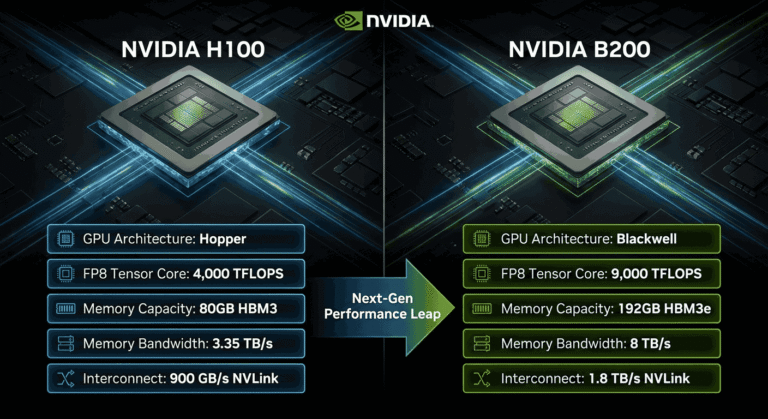
To get 192GB of VRAM on a PC, you would need eight RTX 3090s or expensive enterprise H100 cards costing $30,000+. A Mac Studio costs a fraction of that.
The Catch
Macs are slower. The memory bandwidth is lower than a dedicated NVIDIA GPU.
- PC (NVIDIA): Fast, snappy responses, limited memory.
- Mac (M2/M3 Ultra): Slower responses, infinite memory.
If you want to run the absolute largest models (like Llama 3 70B or Grok-1) locally, a Mac Studio with 64GB+ RAM is technically the best GPU for local LLMs (or rather, GPU alternative) for simple setup and high capacity.
NVIDIA vs. AMD: The ROCm Debate
You might notice this list is dominated by NVIDIA. Is there an AMD contender for the best GPU for local LLMs?
The AMD RX 7900 XTX (24GB)
On paper, this card is great. It has 24GB VRAM and is cheaper than the RTX 4090.
However, the software ecosystem for AI (CUDA) is owned by NVIDIA. While AMD has made strides with “ROCm” (their version of CUDA), it is still buggy and difficult to set up on Windows.
Unless you are a Linux wizard, we do not currently recommend AMD as the best GPU for local LLMs. Stick to NVIDIA for a “plug-and-play” experience with tools like LM Studio.
Robotics and Edge AI: The NVIDIA Jetson
Since this category covers Hardware & Robotics, we must mention “Edge AI.” If you are building a robot (like a customized drone or a rover), you cannot strap an RTX 4090 to it. It consumes too much power.
For robotics, the best GPU for local LLMs isn’t a desktop card; it’s the NVIDIA Jetson Orin.
- Jetson Orin Nano: Can run tiny LLMs and vision models for under $500.
- Use Case: Ideal for robots that need to “see” and “think” without an internet connection.
Building Your AI Rig: Supporting Components
Selecting the best GPU for local LLMs is only step one. Don’t bottleneck your system with bad parts.
- System RAM: If you are offloading layers to the CPU, you need fast DDR5 RAM. Get at least 32GB (preferably 64GB).
- Storage: Loading a 40GB AI model takes time. Use a fast NVMe SSD (Gen 4 or Gen 5) to minimize load times.
- Power Supply (PSU): If you go for the used RTX 3090 route, ensure you have at least an 850W or 1000W Gold-rated PSU. AI spikes power usage heavily.
Summary Recommendation Table
To summarize our search for the best GPU for local LLMs, here is the breakdown by user type:
| User Type | Recommended GPU | VRAM | Est. Price |
|---|---|---|---|
| Beginner / Budget | NVIDIA RTX 3060 | 12GB | ~$280 |
| Mid-Range / New | NVIDIA RTX 4060 Ti | 16GB | ~$450 |
| Enthusiast (Best Value) | NVIDIA RTX 3090 (Used) | 24GB | ~$750 |
| Pro / Trainer | NVIDIA RTX 4090 | 24GB | ~$1,600 |
| Max Capacity | Mac Studio (M2 Ultra) | 128GB+ | ~$4,000+ |
Conclusion
The hardware market is adapting rapidly to the AI boom. In 2026, the best GPU for local LLMs is the one that fits your specific workflow.
If you just want to chat with Llama 3 8B, the cheap RTX 3060 12GB is perfect. If you want to run a smart roleplay model with long context, hunt down a used RTX 3090. And if you are a researcher needing to load massive models, look at the Mac Studio.
The most important takeaway is this: Don’t skimp on VRAM. In the world of local AI, memory capacity is the hard limit. Choose wisely, and enjoy the freedom of offline intelligence.