In the corporate world, your LinkedIn profile picture is your first impression. A grainy selfie or a cropped photo from a wedding doesn’t cut it anymore. But hiring a professional photographer, renting a studio, and buying a suit can easily cost $300 to $500.
Enter the best AI headshot generators for LinkedIn.
For a fraction of the price (usually under $30), these tools take your casual selfies and transform them into high-quality, studio-grade professional headshots. But with dozens of apps flooding the market, many of them produce “uncanny valley” results that look plastic or fake.
In this comprehensive review, we tested the market leaders to find the best AI headshot generators for LinkedIn. We evaluated them on realism, lighting quality, turnaround time, and suit variety to help you land your next job.
Table of Contents
Why Use AI for Your LinkedIn Profile?
Before we reveal the best AI headshot generators for LinkedIn, is it actually a good idea to use one?
Recruiters spend an average of 7 seconds looking at a profile. A professional photo signals competence.
- Cost Efficiency: $29 vs $500.
- Convenience: No need to book appointments or travel.
- Variety: You get 100+ variations (different backdrops, different suits) rather than just 5-10 from a photographer.
However, you must choose the right tool. A bad AI photo looks like a cartoon. A good one is indistinguishable from reality. Here are the contenders.
1. Aragon AI (The Market Leader)
If you are looking for the absolute best AI headshot generators for LinkedIn regarding consistency, Aragon AI is the current king. It was built specifically for the professional use case, not for avatars or fantasy art.
How It Works
You upload 12-14 selfies. Aragon takes about 60 minutes to train a custom model on your face.
The Results
- Realism: 9/10. Aragon is excellent at preserving your eye shape and skin texture. It doesn’t “airbrush” you into a plastic doll.
- Outfits: It excels at standard corporate attire (Navy suits, crisp white shirts).
- Backgrounds: Subtle, blurred office backgrounds that look like a WeWork or a high-end studio.
Pros and Cons
- ✅ Pros: Fastest turnaround; extremely high likeness; money-back guarantee.
- ❌ Cons: Can sometimes struggle with glasses glare.
Verdict: For 90% of users, Aragon is the best AI headshot generators for LinkedIn choice.
2. Secta Labs (The Premium Option)
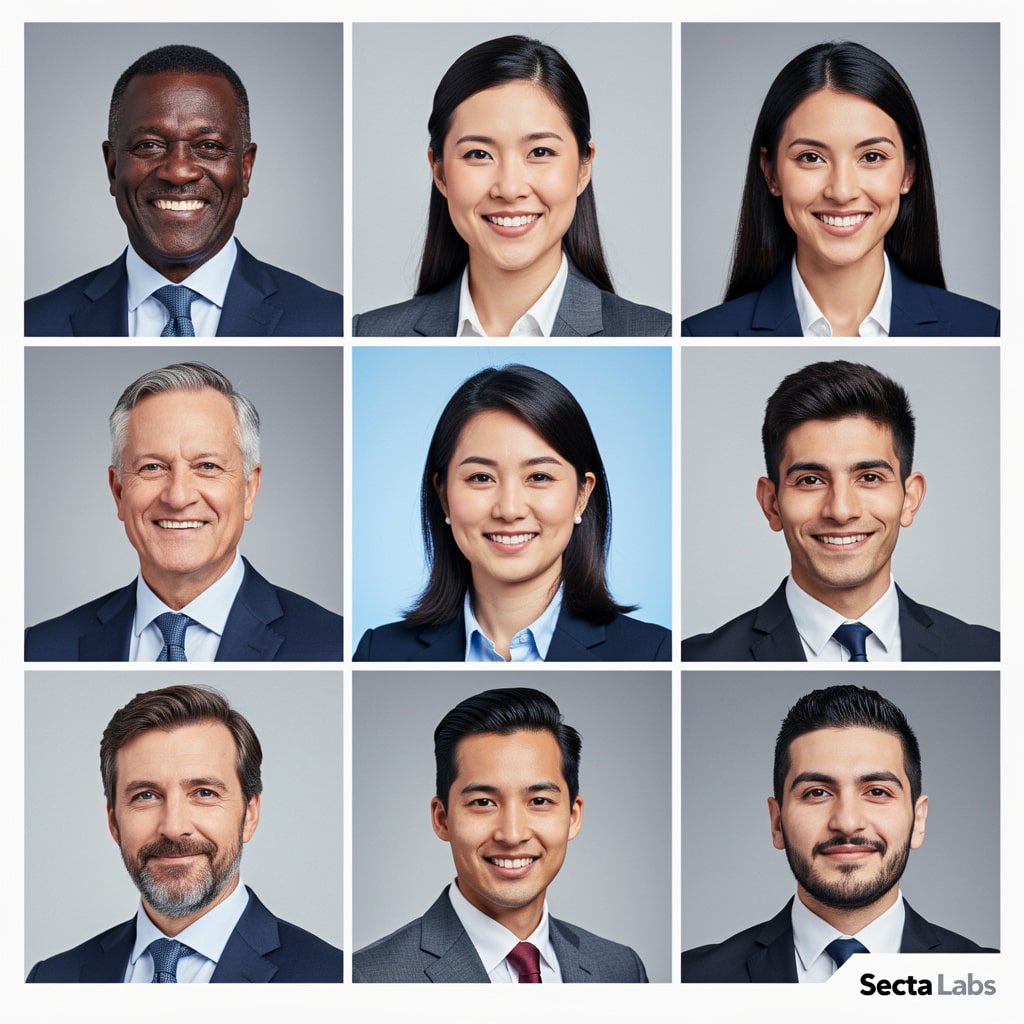
Secta Labs markets itself as a “Photography Killer.” While slightly more expensive, it offers volume. If you want hundreds of options to choose from, this is a top contender among the best AI headshot generators for LinkedIn.
How It Works
Secta requires significantly more photos (20-30) for training. The processing time is longer (around 2 hours).
The Results
- Volume: You get 300+ photos.
- The “Remix” Feature: This is unique. If you like a photo but hate the background, you can swap it instantly without regenerating.
- Upscaling: Secta delivers very high-resolution images suitable for print, not just web.
Pros and Cons
- ✅ Pros: Massive variety; advanced editing tools built-in; distinct “outdoor” lighting options.
- ❌ Cons: Because it generates 300 photos, many will look weird. You have to sift through “bad” ones to find the gems.
Verdict: Secta is one of the best AI headshot generators for LinkedIn if you are a perfectionist who wants to edit the final result.
3. HeadshotPro (Best for Teams)
If you are an HR manager or a CEO looking for the best AI headshot generators for LinkedIn for your entire company, HeadshotPro is the solution.
How It Works
Instead of individual sign-ups, you create a “Team Dashboard.” You invite your employees via email. They upload their own selfies, and the AI generates a consistent look for everyone (e.g., everyone in a grey suit with a white background).
The Results
- Consistency: This is its superpower. It ensures the lighting matches across 50 different employees, even if they took their selfies in different rooms.
- Backgrounds: Offers clean studio white/grey backgrounds ideal for “About Us” pages.
Pros and Cons
- ✅ Pros: Team management dashboard; consistent branding; volume discounts.
- ❌ Cons: Slightly less creative than Aragon; focuses on “uniformity” over “personality.”
Verdict: The best AI headshot generators for LinkedIn for businesses and remote teams. Just like you use AI for your Faceless YouTube Channel, you can use it for your personal brand
4. Try It On AI (The Budget Pick)
Not everyone wants to spend $40. Try It On AI offers a cheaper entry point while still being one of the best AI headshot generators for LinkedIn.
How It Works
It focuses on “Lifestyle” portraits. While Aragon and HeadshotPro are very corporate, Try It On offers casual, friendly vibes (coffee shops, outdoor parks).
The Results
- Vibe: Less “Banker,” more “Creative Director.”
- Likeness: Good, but occasionally struggles with teeth and smile lines compared to Aragon.
Verdict: Good for creative freelancers, but maybe not the best AI headshot generators for LinkedIn for lawyers or accountants.
How to Get the Best Results (The Secret Sauce)
Even the best AI headshot generators for LinkedIn will fail if you upload bad data. The AI follows the “Garbage In, Garbage Out” rule. Here is how to guarantee a perfect result.
1. Lighting is Key
Do not upload photos taken in a dark club or a dim bedroom.
- Tip: Stand facing a window. Natural, even lighting on your face is crucial.
2. Variety of Angles
If every selfie you upload is the exact same angle (e.g., your “good side”), the AI will produce a warped result.
- Tip: Upload straight-on shots, 45-degree angles, and side profiles.
3. Consistency of Age
Do not upload a selfie from 5 years ago mixed with one from today. The AI will blend them and create a weird hybrid age.
- Tip: Take 10 fresh selfies right now specifically for the tool.
The Ethics: Is It “Catfishing”?
A common question when discussing the best AI headshot generators for LinkedIn is honesty. Is it lying?
- The Consensus: If the AI photo looks like you on your best day, it is acceptable. It is no different than wearing makeup or retouching a pimple.
- The Red Line: If the AI changes your weight, bone structure, or race, do not use it. You want to avoid the “shock” factor when you walk into the interview and look nothing like your profile.
The goal of the best AI headshot generators for LinkedIn is enhancement, not deception. While Midjourney Prompts are great for art, dedicated tools are better for headshots
Pricing Comparison Table
Here is a quick breakdown to help you choose the best AI headshot generators for LinkedIn for your budget.
| AI Tool | Price (Approx) | Photos Generated | Turnaround Time | Best For |
|---|---|---|---|---|
| Aragon AI | $29 | 40 | ~60 Mins | Individuals |
| Secta Labs | $49 | 300+ | ~2 Hours | Power Users |
| HeadshotPro | $29/person | 120 | ~2 Hours | Teams / HR |
| Try It On | $17 | 100 | ~24 Hours | Budget / Creative |
Conclusion: Which One Should You Choose?
The technology has matured rapidly. In 2026, the best AI headshot generators for LinkedIn are practically indistinguishable from real photography.
- For Speed and Realism: Choose Aragon AI. It is the most reliable tool we tested.
- For Quantity and Editing: Choose Secta Labs.
- For Companies: Choose HeadshotPro.
Stop using that cropped photo from your cousin’s wedding. For the price of a lunch, you can upgrade your personal brand today using the best AI headshot generators for LinkedIn.